
In this blog post, we’ll explore the concept of vector embeddings and how they can be utilized in machine learning. Vector embeddings are numerical representations of objects (words, images, etc.) that capture their semantic meaning. We’ll use Python to demonstrate how to create and work with vector embeddings.
What Are Vector Embeddings?
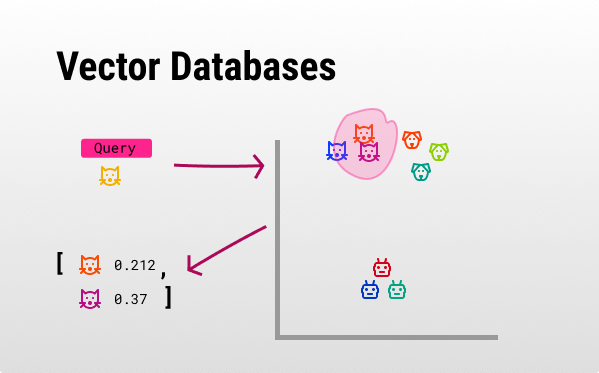
Vector embeddings are numerical representations of objects (such as words, images, or documents) in a continuous vector space where similar objects are positioned closer together. These embeddings capture the semantic meaning and relationships of the objects, making them incredibly useful in machine learning and natural language processing tasks. For instance, in a search engine, vector embeddings can be used to improve search results by understanding the contextual meaning of search queries and matching them with the most relevant documents. For example, if a user searches for “best Italian restaurants,” the search engine can understand the context and return results that include top-rated Italian dining places, even if the exact phrase isn’t present in the indexed documents. This capability enhances the accuracy and relevance of search results, providing a better user experience.
Also see: The Future of AI: Context in AI and Vector Databases –>
Example: Word Embeddings with Gensim
Let’s start with an example of word embeddings using the Gensim library.
Step 1: Install Gensim
!pip install gensimStep 2: Load Pre-trained Word2Vec Model
We’ll use the pre-trained Word2Vec model from Google News.
import gensim.downloader as api

model = api.load('word2vec-google-news-300')
Step 3: Exploring Word Embeddings
Let’s find the vector for a word and perform some operations.
# Get vector for a word
word_vector = model['king']

# Find similar words
similar_words = model.most_similar('king', topn=5)
print("Similar words to 'king':", similar_words)

# Vector arithmetic
result = model.most_similar(positive=['king', 'woman'], negative=['man'], topn=1)
print("Result of 'king' - 'man' + 'woman':", result)
Creating Custom Embeddings with Sentence Transformers
Now, let’s create custom embeddings using the sentence-transformers library.
Step 1: Install Sentence Transformers
!pip install sentence-transformersStep 2: Generate Sentence Embeddings
from sentence_transformers import SentenceTransformer

# Load pre-trained model
model = SentenceTransformer('all-MiniLM-L6-v2')

# Encode sentences
sentences = ["This is an example sentence", "Each sentence is converted"]
embeddings = model.encode(sentences)

print("Sentence Embeddings:")
for sentence, embedding in zip(sentences, embeddings):
    print(f"Sentence: {sentence}\nEmbedding: {embedding[:5]}...\n")
Visualizing Embeddings with t-SNE
To visualize high-dimensional embeddings, we can use t-SNE.
Step 1: Install t-SNE
!pip install scikit-learn matplotlibStep 2: Visualize Embeddings
import matplotlib.pyplot as plt
from sklearn.manifold import TSNE

# Reduce dimensions
tsne = TSNE(n_components=2, random_state=0)
reduced_embeddings = tsne.fit_transform(embeddings)

# Plot
plt.scatter(reduced_embeddings[:, 0], reduced_embeddings[:, 1])
for i, sentence in enumerate(sentences):
    plt.annotate(sentence, (reduced_embeddings[i, 0], reduced_embeddings[i, 1]))
plt.show()
Conclusion
Embeddings by means of vectors are powerful tools for capturing the semantic meaning of objects. They can be used in various applications like natural language processing, image recognition, and more. By leveraging libraries like Gensim and Sentence Transformers, we can easily generate and work with embeddings in Python.
Looking for a vector database integration? Contact us at Dolphin Studios to learn more –>